We know that cyberactors not only exfiltrates and encrypt your data, they also target the backup. If they can kill your ability to restore your services then they will be in a better position to hold your money ransom and in the end game giving you no other option than to pay up. So basically, if your offsite copy can be reached with credentials from your own environment, it goes too.
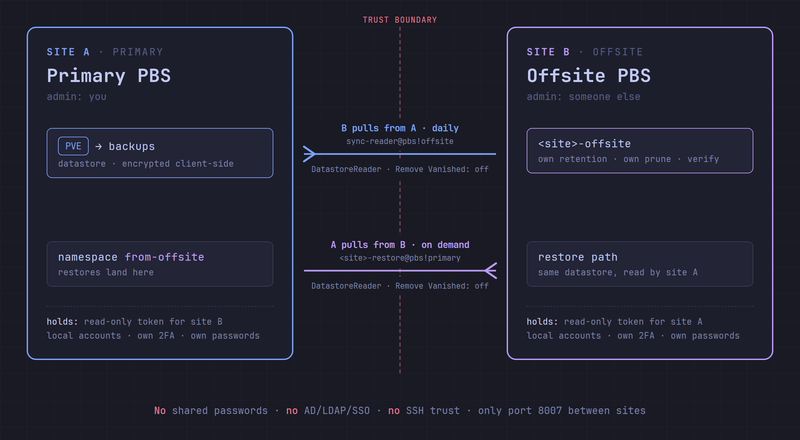
This post shows a simple Proxmox Backup Server (PBS) setup where two independent sites keep copies of each other’s backups, and neither can delete anything on the other. It works for a company and a service provider, two companies, or two homelabbers swapping disk space.
- If the primary is compromised, the data is safe at the offsite.
- If the offsite is compromised, the data is safe at the primary.
Everything is done in the PBS GUI and utilizes only read tokens to get the data. All pruning and garbage collection is done locally on the data the local PBS has in its datastore.
Note; this article focuses on the how to copy and protect the data. Everything else you should have done like SSL, firewall, VPN, MFA, encryption etc I just assume you have control of.
1. Pull, don’t push#
With push, the primary holds credentials that can write to the offsite, and usually delete as well. Anyone who owns the primary owns the offsite copy too.
So we use pull instead. Each side gets a read-only token for the other, and only ever fetches.
2. Keep the sites separate#
The tokens only help if the sites are truly separate:
- Different admins, ideally different organisations.
- No shared passwords, anywhere.
- No shared password vaults, even if you have separate passwords, please dont save them in same place!
- Only use tokens, for all the automation, use only tokens.
- No AD, LDAP or SSO on the offsite. Local accounts only.
- 2FA on all interactive accounts.
- Separate hardware and network. Only port 8007 open between the sites, from known addresses.
- No SSH trust or shared automation accounts.
These things are very important. The offsite PBS needs to be in a jail that is not approachable execept if the wind is blowing south while the wolves are houling and its raining angels in hell.
3. Encrypt, and store the key elsewhere#
Use client-side encryption in PVE, so the offsite only sees encrypted chunks. Export the key as a paper key and keep it outside both environments. This key is vital if you need to restore, so keep it safe!
4. Naming and certificates#
Every object below lives on one of the two servers. <site> is a short name for the site being protected, for example acme. Two rules of thumb make the names easy to read:
- A token is named after who holds it.
sync-reader@pbs!offsitelives on the primary, but it is the offsite that holds and uses it. - A remote is named after where it points. The remote
offsiteon the primary points to the offsite server.
On the primary:
| Object | Name | What it is for |
|---|---|---|
| User | sync-reader@pbs | The account the offsite logs in as |
| API token | sync-reader@pbs!offsite | The offsite’s read-only key to the primary |
| Remote | offsite | Points to the offsite, used to pull back restores |
| Namespace | from-offsite | Where restored backups land |
On the offsite:
| Object | Name | What it is for |
|---|---|---|
| Datastore | acme-offsite | The copy of acme’s backups, one datastore per site |
| User | sync-owner@pbs | Owns the synced backups. No token, never logs in |
| User | acme-restore@pbs | The account the primary logs in as for restores |
| API token | acme-restore@pbs!primary | The primary’s read-only key to the offsite |
| Remote | acme | Points to the primary, used by the daily pull job |
So each server holds exactly one token for the other one, and both tokens are read-only.
Certificates: optional, but recommended. Give both servers a valid certificate, for example via ACME. Then the remote’s Fingerprint field stays empty and you connect with the FQDN from the certificate. With a self-signed certificate, use the fingerprint from Dashboard → Show Fingerprint.
5. Read-only user and token#
Repeat this process on both PBS servers, using the naming standard above (or adapt it to your liking). This will be used in in sections 6 and 8.
- Configuration → Access Control → User Management → Add. Realm
pbs, long random password that you don’t store - just max the 64 charactes with random data. - API Token → Add. Copy the secret, it is shown once.
- Permissions → Add → User Permission. Path
/datastore/<datastore>, role DatastoreReader. - Permissions → Add → API Token Permission. Same path and role.
Both user and token need the permission. Never grant it on /datastore as a whole. DatastoreReader can read backups, but not create, prune or delete them. Especially important if the remote PBS will store data for more than one “customer”.
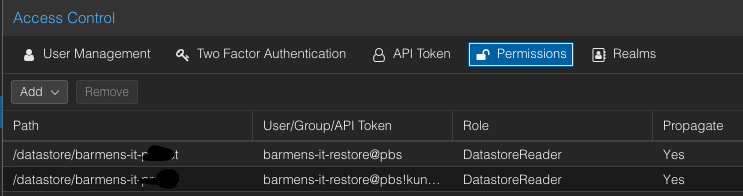
My token name is the wrong naming standard… sorry about that!
6. Primary: read access for the offsite#
- Create
sync-reader@pbswith tokenoffsiteand DatastoreReader on the primary datastore. - Send the secret (and fingerprint, if needed) to the offsite admin over a secure channel.
No need for a new image, it would look the same as 5, just the sync-reader user and token.
7. Offsite: datastore and pull job#
Datastore: create <site>-offsite. Create sync-owner@pbs and give it DatastoreBackup on that datastore.
Configuration → Remotes → Add:
| Field | Value |
|---|---|
| Remote ID | <site> |
| Host | primary’s FQDN |
| Auth ID | sync-reader@pbs!offsite |
| Password | token secret |
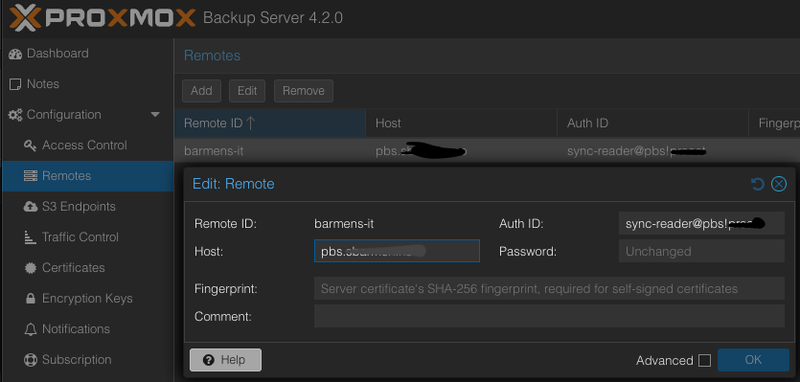
Datastore → <site>-offsite → Sync Jobs → Add Pull Sync Job:
| Field | Value |
|---|---|
| Location | Remote |
| Source Remote | <site> |
| Source Datastore | primary datastore |
| Local Owner | sync-owner@pbs |
| Sync Schedule | daily, after the backup window |
| Remove Vanished | not checked |
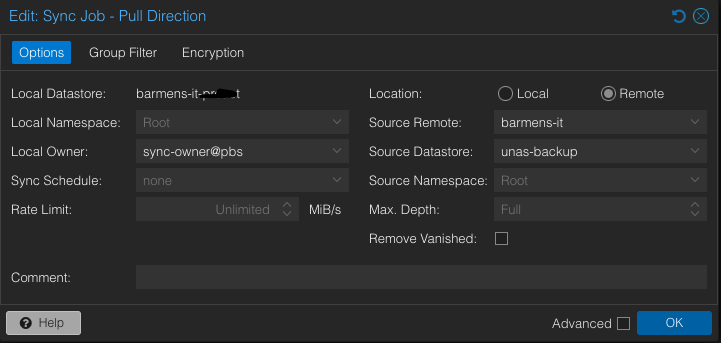

Important: Never check Remove Vanished. Deletions on the primary must not reach the offsite. If this is on an atacker could just delete the local copies, and when the next pull sync job runs it will delete also the data on the offsite.
Prune & GC Jobs: set retention and GC here. Retention is set separately for the offiste copy, make this as long as you think you need. I suggest a minimum of 14 days of daily copies. A Verify Job is a good idea too.
8. Offsite: read access for the primary#
This part is needed when the primary wants to do a restore. I suggest setting it up to test and verify. What good is a backup without the ability to restore?
- Create
<site>-restore@pbswith tokenprimaryand DatastoreReader on/datastore/<site>-offsite. - Send the secret to the primary admin over a secure channel.
9. Primary: pull back and test#
By having a local namespace you can use the same datastore that you have to pull back to. This also ensures minimal data transfer - but you can of course also create a separate datastore locally if you want. If you just use a namespace only chunks missing locally are transferred.
Content → Add Namespace: from-offsite.
Configuration → Remotes → Add: Remote ID offsite, the offsite’s FQDN, Auth ID <site>-restore@pbs!primary, token secret as password.
Sync Jobs → Add Pull Sync Job:
| Field | Value |
|---|---|
| Source Remote | offsite |
| Source Datastore | <site>-offsite |
| Local Namespace | from-offsite |
| Sync Schedule | empty (manual) |
| Remove Vanished | not checked |
| Group Filter | one test VM, e.g. vm/113 |
| Advanced → Transfer Last | 1 |
Try to restore the VM in PVE. This also proves the encryption key is available.
For a real recovery, change the group filter and run the job manually.
10. What an attacker can do#
| Compromised | Can | Cannot |
|---|---|---|
| Primary | Delete local backups, read offsite copy | Touch anything on the offsite |
| Offsite | Delete offsite copy, read primary backups | Touch anything on the primary |
| A stolen token | Read encrypted chunks | Write, delete or decrypt |
Only both sites compromised at once beats this. That’s what section 2 is for.
11. Worth remembering#
- Retention. Attackers can wait weeks. Keep enough history to reach a clean point.
- Monitor from the offsite. A failing pull job is an early warning, and a compromised primary can’t be trusted to alert. See my post on monitoring PBS with Uptime Kuma.
- Choose the other admin carefully. They are part of your security.
12. Potential next steps?#
If this is no enough I have only two things to suggest.
First would be to create an immutable snapshot (WORM - Write Once, Read Many)) of your datastore. Some NAS systems can do this, create a snapshot that is set immutable and basically makes it undeletable by the storage admin. This functionality needs to be used with caution though. Do this wrong and you fill up your disks without the ability to delete, it really is immutable! I know that NetApp, Dell, Synology, Pure and QNAP (and probably many more) can do this. Also you can get this functionality on public cloud providers if you choose to build your offsite solution there.
Second option is the obvious one, use tape. Saving a copy of your backup on tape is never wrong and will protect your data from any network based attack (as long as you take the tapes out of the drive!).
13. Postludium#
What do you think? Is this a a good and secure approach to protect offsite copies of your backup data? Please suggest improvements if you have any suggestions or just want to share your voice.